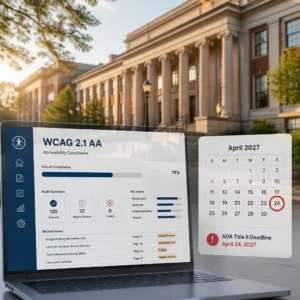


The ADA demand letter shows up in the mail. No matter what delivery method is adopted, including sending emails containing compliant PDFs to a corporate general counsel’s mailbox, website accessibility barriers for people with disabilities remain a core compliance issue. Here is what the plaintiff wants paid. Here is the deadline. And here is what happens if you ignore any of it.
If you just opened one of these letters, take a breath first. You are not the only business dealing with this right now. UsableNet’s tracking data logged more than 5,000 digital accessibility lawsuits across federal and state courts during 2025. Attorneys who work in this space will tell you the same thing off the record. For every filed lawsuit, roughly seven to ten letters go out first. Most never become public.
This post is the practical playbook. What the letter really is. The moves you need to make in the next two days. When settlement makes sense and when it just kicks the problem down the road. How real remediation strengthens your legal position. And why hiring only one specialist leaves gaps.
What This Letter Actually Is / and What It Is Not
At its core, an ada demand letter is a private threat of litigation. It comes from a plaintiff’s attorney who represents someone with a disability, usually someone using a screen reader, who says they could not use your site. The letter itself is not a court filing. It is a pre-suit demand. Meaning: fix this or we sue.
Almost every letter follows the same recipe:
- Alleged accessibility barriers on specific pages of your site
- A settlement number the plaintiff wants
- A demand that you remediate by a certain date
- A response deadline, typically somewhere between two and four weeks
Miss the deadline and the same firm can walk your letter over to federal court. That is the pipeline.
Does the Americans with Disabilities Act apply to all types of websites? The answer is yes. The core legal basis underpinning all relevant judicial practice is the 2019 case of Robles v. Domino’s, adjudicated by the United States Court of Appeals for the Ninth Circuit. The court held that a website tied to a physical restaurant fell under Title III of the ADA. If your business has a storefront, a service location, or any physical footprint connected to your website, most courts will treat the site as a place of public accommodation.
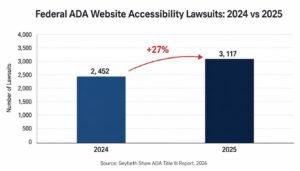
And the filings keep climbing. Seyfarth Shaw’s annual tracking report on adatitleiii.com, published in early 2026, counted 3,117 federal website accessibility lawsuits during 2025. Up 27 percent year over year. That is federal court only. State court filings add thousands more, especially in New York, California, Florida, and Illinois.
The point is simple. Demand letters are not scare tactics. Ignore one and there is a real chance you land in court. If you are already thinking about next steps, our legal strategy support can help you move fast.
Your First 48 Hours: The Moves That Actually Matter
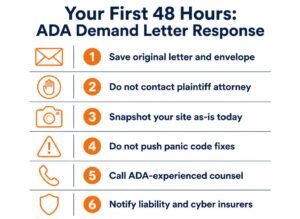
The first two days matter more than any two days that come after. What you do here shapes your legal position for the rest of the case. So do these things in order.
Save the original letter. Save the envelope with the postmark showing. If it came by email, save the full message with headers intact. Do not print, mark up, or annotate the original.
Do not respond to the plaintiff’s attorney yourself. Not even to say “we are looking into it.” Anything you write ends up as evidence later. This is not the moment to be helpful or apologetic.
Do not push a panic fix to your live site. Rushed changes without documentation create evidentiary problems, and if you break something in the process, you have made your case worse.
Take a full snapshot of the site as it stands today. Every page named in the letter. Every PDF linked from those pages. Every embedded video. Freeze it. You may need to prove later what the site looked like the day the letter arrived.
Now call an attorney with actual ADA website experience. Your regular corporate lawyer almost certainly does not have it. This is a specialty. If you also need broader website accessibility lawsuit help, look for a firm that partners with an accessibility team directly instead of outsourcing the technical piece to a stranger.
Also call your insurance broker. Some cyber liability policies and some general liability policies cover ADA claims. Late notice can void that coverage.
And read the deadline in the letter again. It is not “two weeks.” It is 48 hours to assemble your team.
Mistakes That Turn a Manageable Case Into a Bad One
Here is what not to do. I have seen every one of these happen, more than once.
Do not email the plaintiff’s attorney back with your side of the story. It becomes discoverable.
Do not slap an overlay widget on the site and call it fixed. Overlays do not repair the underlying code, and courts know that now. Sites running overlays get sued at essentially the same rate as sites without them.
Do not delete pages named in the letter. Removing evidence after a legal demand looks awful. In some cases, courts call that spoliation and the sanctions can be worse than the original claim.
Do not just pay the demand without also fixing the site. A settlement without remediation buys you nothing except a target painted on your site for the next plaintiff.
Do not assume that the content management system you use can meet accessibility compliance standards. The claim that mainstream e-commerce site-building platforms have never been involved in accessibility-related lawsuits is untrue; five such platforms, including Shopify, have been held legally liable. The platform is not the fix.
Each of those looks small by itself. Stack a few together and a manageable letter becomes an ugly filed case.
Settlement vs Remediation: Comparing Your Real Options
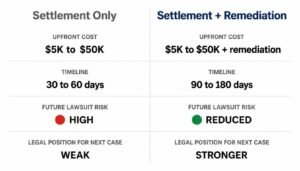
You have two real levers. Most cases end up using both, in some combination, and the order matters.
Settlement is where you pay the plaintiff to drop the claim. In almost every case you also sign a written agreement to remediate the site inside a 90 to 180 day window. Tracking data from the third-party organization Accessible.org shows that standard pre-litigation settlement amounts range from US$5,000 to US$50,000, while equivalent settlements for small businesses range from US$5,000 to US$15,000. Faster than court? Definitely. Final? No. You still owe the remediation. And nothing stops another plaintiff from filing a fresh letter next month if your site is still inaccessible.
Remediation is where you actually fix the barriers in the code. This is the only route that lowers your long term legal exposure. It is the foundation of any real ada demand letter response. Without remediation, settlement is just a payment plan on your next lawsuit.
Which one first? In practice, both run at the same time. Your lawyer negotiates settlement terms while your accessibility team starts the highest priority code fixes. A documented remediation record actually makes your settlement position stronger, not weaker. It also cuts your exposure to follow up suits.
One thing to watch. Post filing costs are a different animal entirely. Once a case is formally filed in court, pre trial settlements typically land between $30,000 and $150,000 based on Accessibility. build’s data. That is before defense legal fees. And in California, the Unruh Civil Rights Act tacks on statutory damages of at least $4,000 per violation per visit. That compounds fast on a large e-commerce site with dozens of pages the plaintiff claims to have tried.
For context on the top of the range, Fashion Nova reportedly settled a class action web accessibility case for $5.15 million in 2025. That is not what most defendants pay. But it shows how ugly the numbers can get when a case escalates.
WCAG 2.2 AA: The Standard Your Defense Is Built On
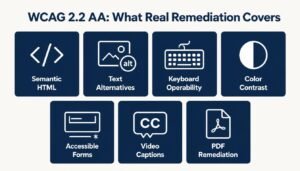
Every serious ada lawsuit defense accessibility plan rests on one technical benchmark. WCAG 2.2 Level AA.
The Web Content Accessibility Guidelines come out of the W3C. They are the standard cited most often in ADA website cases. Federal agencies use them as the framework for Section 508 compliance. The DOJ’s Title II final rule points to WCAG 2.1 AA for state and local government sites. And courts, more and more, treat documented WCAG 2.2 AA conformance as good faith evidence that a defendant actually took accessibility seriously.
Code level remediation is the only thing that holds up under legal scrutiny. Real work looks like this:
- Semantic HTML so screen readers can parse the page structure
- Meaningful text alternatives for images, icons, charts, and other media
- Full keyboard operability, so every interactive element works without a mouse
- Contrast ratios that meet AA thresholds for text and UI components
- Forms with real programmatic labels, clear error messages, and focus handling
- Captions and audio descriptions for video content
- PDF documents remediated for screen reader compatibility
None of this is what overlay widgets deliver. Widgets cannot rewrite your HTML, cannot restructure your DOM, and cannot repair broken form labels. Real ada compliance services do the actual code work. They audit the site against WCAG 2.2 AA, prioritize the violations by legal risk, and hand back a documented remediation record you can produce for a judge.
Paperwork counts as much as the fixes here. Judges and opposing counsel want proof, and proof means artifacts. Audit reports with dates. Ticket histories showing what was fixed and when. Before and after test results. Ongoing monitoring logs. A solid chain of written evidence is the core condition that distinguishes cases closed within a few weeks from those that drag on for a full year. That is what real ada letter website defense looks like on paper.
See how our legal documentation service builds that record for you.
Why You Need Both a Lawyer and an Accessibility Expert
A lawyer working alone cannot fix your site. An accessibility firm working alone cannot run your legal defense. Cases that split these two teams, or worse only use one, go badly more often than not.
Here is the split that works. Your attorney handles the legal work. Jurisdiction. Standing challenges. Researching the plaintiff’s filing history. Negotiating settlement. Notifying your insurers. Any court filings. Your accessibility partner handles the technical work. Auditing your site. Building the remediation roadmap. Doing the actual fixes. Testing against WCAG 2.2 AA. Producing the documentation your attorney will submit.
The hard part is the handoff. When these two teams talk to each other directly, instead of routing everything through you, response time drops a lot. Your legal strategy shapes what gets fixed first. The remediation progress makes your legal position stronger. This is where an integrated legal strategy service really earns its cost.
For most defendants, one firm covering both the legal documentation side and the strategy side is the cleanest path. Less conflicting advice. Fewer missed deadlines. No gaps in your evidence record. Before you sign a full engagement with anyone, start with a free accessibility assessment first. Any firm worth hiring can scope your exposure before they ask you to commit.
Frequently Asked Questions
Can I ignore the letter and hope nothing happens? No. Silence is what most plaintiffs’ attorneys are hoping for. Ignored letters routinely turn into filed federal lawsuits, and post filing settlements cost several times what a pre litigation deal would have run. You also give up all your leverage on timing, payment size, and confidentiality when you stay silent.
Will an accessibility widget make this go away? No. Widgets do not fix the underlying code issues named in the letter. Plaintiffs’ firms specifically call out widget only fixes in their court filings, and sites running them keep getting sued at the same rate as sites without them.
How long does WCAG 2.2 AA remediation actually take? Depends on the site. A small brochure site can often be substantially remediated in six to twelve weeks. Large e-commerce platforms with thousands of pages of content generally require a 3 to 6 month timeline to complete phased rectifications. If these platforms engage legal counsel as early as possible, the deadlines stated in most legal demand letters can be renegotiated.
If I fix everything, am I safe from future lawsuits? Nothing takes your risk to zero. But documented WCAG 2.2 AA conformance combined with ongoing monitoring meaningfully reduces your legal exposure and strengthens your position if someone files a new claim later. It is the strongest defense available today.
Conclusion
An ADA demand letter on your desk does not mean the case is lost. It means the clock has started. Enterprises that proactively pursue compliance, integrate legal requirements into code rectification work, and maintain full documentation across all processes are in a far better position than those that take a wait-and-see approach. WCAG 2.2 AA is by no means simply a technical checkbox item. WCAG 2.2 AA conformance is not just a technical checkbox. It is your primary legal defense. Get the right team in place within 48 hours and you shift from reactive to prepared.