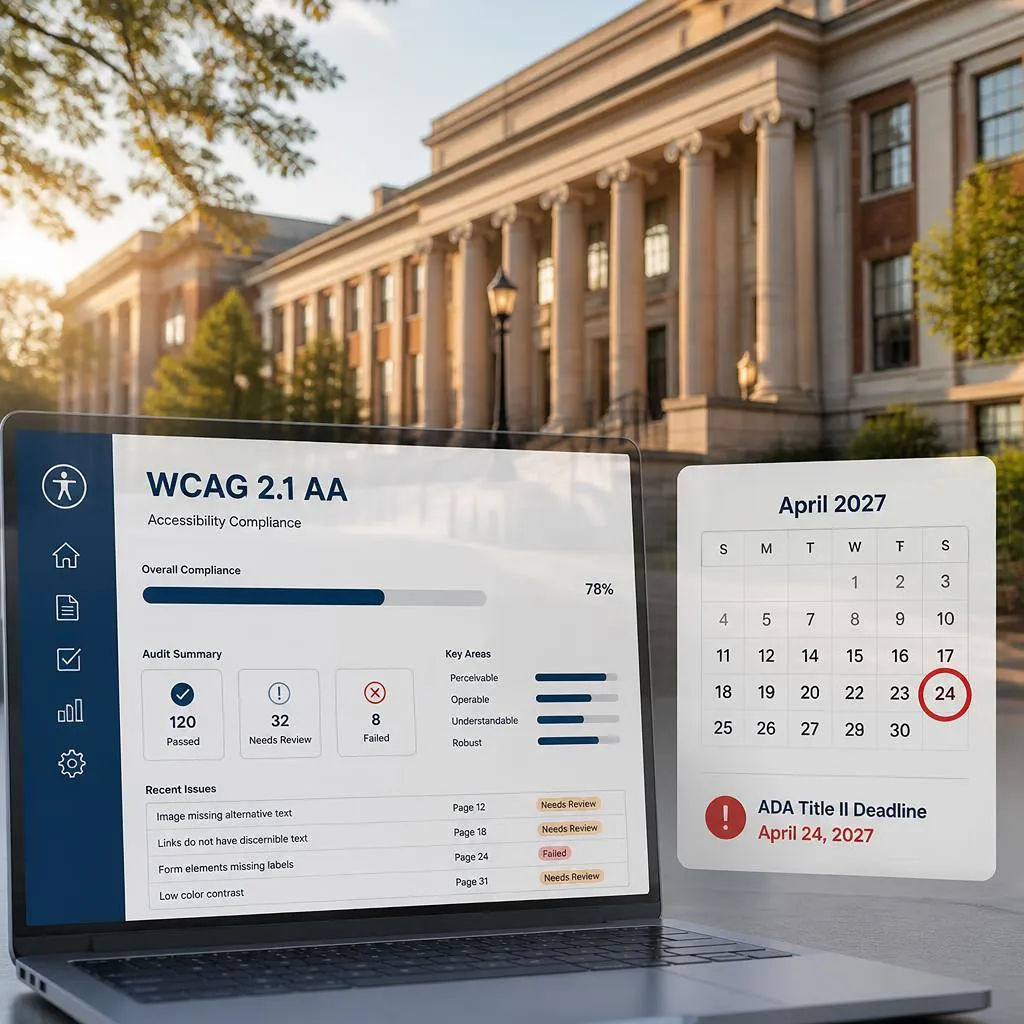
Circle April 26, 2027 on your calendar. If your public university serves a population of 50,000 or more, that date is your federal compliance deadline under the new ada title ii higher education rules. Behind it sits DOJ enforcement, OCR complaints, and the usual line of plaintiff firms watching for stragglers.
Now the uncomfortable number. Roughly 97 percent of American colleges and universities currently fall short of WCAG AA, based on QualiBooth’s analysis of Anthology’s 2025 survey data. Ninety-seven percent. That happens to be the exact technical standard the law now requires. So when a compliance officer tells me their campus is “probably fine,” I ask one question. Has anyone actually tested it? Almost every time, the answer is no.
So here is what I want to do with this post. Walk you through the DOJ rule minus the legalese. Sort out which deadline is actually yours. Translate WCAG 2.1 AA into plain work items your team can schedule. And sketch a realistic starting sequence for campuses that, frankly, have not done much yet.
What ADA Title II Higher Education Rules Actually Require
A little history first, because it explains the panic. Title II is the section of the ADA covering state and local government entities, and public universities have lived under it since 1990. The problem was always the web. The statute predates the modern internet, and for decades the regulation never named a technical standard for digital content. Everybody leaned on WCAG anyway, courts and plaintiffs and settlement agreements alike. Institutions, meanwhile, had just enough wiggle room to argue about what accessible even meant. Plenty of them used it.
That wiggle room is gone now. April 2024 is when the DOJ finalized its rule, codified at 28 C.F.R. Part 35, and for once a federal regulation just says the standard out loud: WCAG 2.1 Level AA. No more debate about the benchmark.
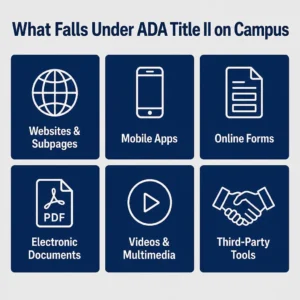
Where people get tripped up is the reach of it. Administrators tend to picture the main website and stop there. The rule does not stop there. It reaches any web content or mobile app your institution provides, or makes available, while delivering programs, services, or activities. On a real campus, that covers a lot:
- Your main .edu site plus every departmental page hanging off it
- Mobile apps used by students, faculty, or the public
- Online forms. Admissions, financial aid, registration, housing, all of it
- PDFs and other electronic documents used to apply for or receive a service
- Course videos, recorded lectures, and other multimedia
- Third-party tools you provide through contracts or licensing arrangements
Read that last bullet twice. If you licensed a scheduling tool and the vendor’s product is inaccessible, that is your compliance problem now, not just theirs. Every procurement contract going forward needs WCAG 2.1 AA language and a current accessibility conformance report attached. Most institutions have not updated their purchasing templates yet. Start there if nowhere else.
Which Deadline Applies to You
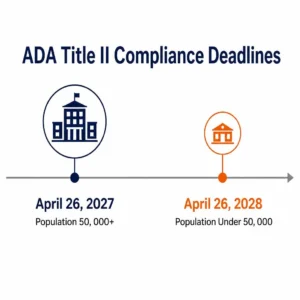
April 2026 is when the DOJ walked the original dates back by a year, through an interim final rule, and that is why two dates now matter instead of one. Fifty thousand people or more in your service population, which covers most four-year public universities, puts you on the April 26, 2027 clock. Fall under that number, or you’re a special district government, and you get until April 26, 2028 instead. Some community colleges land in the later group. I would still check the actual census figures for your service area before assuming, since the math is not always intuitive.
One warning about that extension, though. It paused nothing. The DOJ said so directly in the rule text. Covered entities are expected to keep working toward compliance throughout the extended window. An institution that waits until January 2027 to begin has already lost the race. The remediation workload across a typical campus is simply too large to compress into a few months.
University Website Accessibility: What WCAG 2.1 AA Looks Like Day to Day
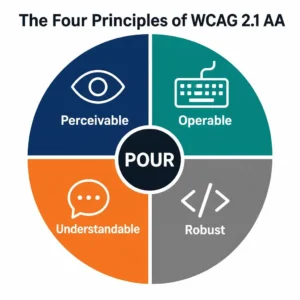
Underneath all the acronyms, WCAG 2.1 AA is really just four ideas stacked on top of each other. Can people perceive the content. Can they operate the interface. Does it all make sense to them. Is the underlying code solid enough for assistive tech to read correctly. Practitioners shorten that to POUR, and every success criterion in the standard traces back to one of those four ideas somehow.
So what does that mean for whoever owns your university website accessibility program? Roughly this.
Perceivable content means nobody gets locked out of information because of how it is presented. Every meaningful image carries a text alternative. Videos carry captions, and audio descriptions where the visuals matter. Color alone never carries meaning. Body text hits a contrast ratio of at least 4.5 to 1 against its background. Basic stuff, honestly. It still fails constantly on campus sites.
Operable means the entire site works on a keyboard alone. No mouse required, ever. Tab, Enter, arrow keys. Every menu, every form field, every embedded widget. If a student using a screen reader cannot reach your financial aid form by keyboard, that page fails, and that particular failure is exactly the kind that draws complaints.
Understandable covers language declarations in your page code, error messages that actually explain what went wrong and how to fix it, and navigation that behaves consistently from one page to the next. Nothing exotic here. Just discipline, applied across thousands of pages.
Robust is about clean markup. Semantic HTML that assistive technology can parse without guessing. ARIA attributes only where native elements fall short. Valid code that does not confuse a screen reader into reading nothing at all.
The LMS, the Portal, and Ten Years of PDFs
Here is where budgets get real. Your Canvas or Blackboard or Moodle instance is not compliant just because the vendor brochure says so. The platform shell might pass a basic check. The content sitting inside it is a different story entirely. Faculty upload scanned PDFs with no text layer. Slide decks get exported without tags. Lecture recordings sit there without captions. All of it counts when it delivers a program or service.
LMS accessibility is honestly the heaviest lift in most higher education web accessibility programs. It takes faculty training, and the need is not small, because fewer than 25 percent of faculty even consider accessibility when building course materials, per Anthology’s 2025 survey. It takes a remediation pipeline for the legacy document pile that has accumulated over a decade. It takes vendor pressure through VPATs and contract language. And it takes a documented exception process for the rare content you genuinely cannot fix right away, paired with a real alternative access path for anyone who needs it.
Your student portal sits in scope too. So does the library database interface, the advising scheduler, the health services booking page. The ada compliance for schools net is wide, and it was drawn that way on purpose.
PDFs deserve their own paragraph. The rule does carve out an exception for certain pre-existing conventional documents. That exception dies the moment a document is used to apply for or receive a service. Admissions applications. Financial aid worksheets. Accommodation request forms. Syllabi in active courses. None of those qualify for the carve-out. They must meet WCAG 2.1 AA. Full stop.
Where to Start If Your Campus Is Behind
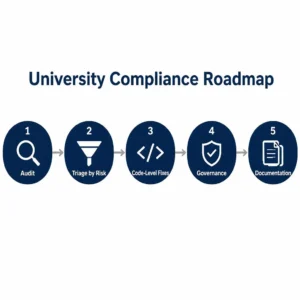
Most are, so no shame in it. And the population depending on this work is not hypothetical. Around 20 percent of higher education students live with some form of disability, per Level Access research from 2026. One in five of the people you serve. Here is the sequence that actually works.
Get a real audit first. Automated scanners catch maybe 30 to 40 percent of WCAG failures on a good day. The rest need manual testing by people working with actual assistive technology. Scope the audit across your main site, your high-traffic department pages, the LMS, the portal, your mobile apps, and a fair sample of that PDF library. What you want back is a prioritized findings report your team can act on. Not a 400-page scan export nobody will read. A properly scoped university website accessibility audit gives you exactly that.
Then triage by legal risk, not by convenience. Forms tied to receiving services go first. Admissions, aid, accommodations. High-traffic prospective student pages come next. That archived 2014 newsletter nobody has opened in years? Bottom of the list, and possibly covered by an exception anyway.
Fix things in the code. This is the part where I get blunt. Overlay widgets do not produce conformant content. They inject scripts over broken pages. They cannot repair your HTML, cannot restructure your DOM, and cannot touch a PDF. The DOJ measures your actual content. So do courts. Real remediation happens in your templates, your components, your documents, and your media files. Anything else is decoration on top of a failing grade.
Build governance so you never do this twice. New content, new contracts, new templates, new course materials, all held to WCAG 2.1 AA by written policy. Publish an accessibility statement. Stand up a barrier-report process so users can flag problems. Give one office genuine ownership of ongoing monitoring, with authority to push back on departments.
Document everything as you go. The ada title ii 2027 deadline makes your paper trail matter enormously. Audit reports, remediation tickets, vendor emails, training attendance records. If a complaint lands before your deadline, that record is what demonstrates good faith. Institutions with a documented program in motion sit in a completely different legal position than institutions with nothing.
Not sure how deep your gaps run? A free accessibility assessment will show you before you commit real budget to anything.
Frequently Asked Questions
Does Title II apply to private universities?
No. The Title II rule covers public institutions only. Private colleges answer to ADA Title III instead, plus Section 504 if they accept federal funding, which nearly all do. Different statutes, similar exposure. Harvard and MIT both settled high-profile accessibility cases, so private status is no shield at all.
What actually happens if we miss April 2027?
DOJ enforcement becomes possible. So do OCR complaints filed by students or staff, and private lawsuits on top of that. Institutions holding documented remediation progress sit in a far stronger position than ones with nothing to show. Starting now is itself a defense strategy, because the record you build is the argument you will make later.
Can we lean on the password-protected course content exception for our LMS?
Carefully, and probably less than you are hoping. The exception is narrow. It covers specific secured course content in limited circumstances, and faculty-created materials used to deliver services may fall outside it entirely. Get your general counsel’s read before building any compliance plan around that exception. Relying on it broadly is a gamble.
Do we really need a VPAT for every third-party tool?
For anything used to deliver programs or services, yes. You need an accessibility conformance report, which is what a VPAT documents. That covers LMS platforms, advising tools, library systems, event registration, the works. Demand current VPATs during procurement, and actually read them critically. A three-year-old VPAT full of “partially supports” entries is a red flag, not a reassurance.
Conclusion
The ada title ii higher education deadline of April 26, 2027 is close enough to touch. The law now reaches your website, your mobile apps, your LMS, your portals, and every PDF still doing active duty on campus. None of it is aspirational anymore. My advice, for whatever it is worth after years of this work: get the audit moving before your next budget cycle, put the riskiest forms at the front of the line, insist on code fixes over cosmetic patches, and keep records of everything. Campuses that do this walk into 2027 with a defensible story to tell. The rest are betting on luck.