If you own or run a website in the US, you’ve probably had “WCAG 2.2 checklist” thrown at you in a meeting, a vendor deck, or worse, a legal notice. What nobody hands you is a plain version you can actually work from. So here’s one.
This is a complete, plain-English WCAG 2.2 checklist for 2026. It walks through every Level A and AA success criterion, flags the six requirements that are new in 2.2, and sets the whole thing against the current US legal picture, including where ADA lawsuit numbers landed in 2025, the updated DOJ Title II deadlines, and the European Accessibility Act now that it’s live. We’re a US-based accessibility team, so this is written for how compliance actually plays out here, whether you’re a business owner, a compliance lead, a marketer, or the developer who has to ship the fixes.
Why WCAG 2.2 AA became the standard
The W3C published WCAG 2.2 in October 2023. Since then it’s quietly become the reference point for digital accessibility more or less everywhere. WCAG 2.1 AA is still the exact wording in some rules, most notably the DOJ’s Title II rule for state and local government, but 2.2 AA is what keeps showing up in settlements, procurement paperwork, and newer laws like the European Accessibility Act.
For a US business, aiming at WCAG 2.2 AA is just the smarter bet. It carries everything 2.1 did and adds protections for mobile users, people with low vision, and people with cognitive or motor disabilities. That last group covers a big slice of the barriers real users hit every day, which is exactly where a lot of sites quietly fail. An accessibility audit against 2.2 catches those before a plaintiff’s scanner does.
The legal picture in the US right now
The business case writes itself. More than 5,000 digital accessibility lawsuits were filed across US federal and state courts in 2025, according to UsableNet’s year-end tracking. Federal filings on their own hit 3,117, a 27% jump over 2024, per Seyfarth Shaw. UsableNet projects roughly 6,176 cases for 2026, another 20% climb.
E-commerce took the brunt of it. Online stores were the target in nearly 70% of ADA web suits in 2025, with food and service businesses making up around 21%. And getting sued once doesn’t buy you peace: 1,427 of the 2025 cases named companies that had already faced a prior ADA web claim. Fix it and forget it isn’t a strategy anymore.
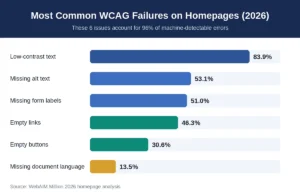
Here’s the part worth memorizing. Six failure types account for 96% of the errors automated scanners flag on homepages: low-contrast text (found on 83.9% of pages), missing alternative text (53.1%), missing form labels (51.0%), empty links (46.3%), empty buttons (30.6%), and a missing document language declaration (13.5%). Those are the first things plaintiff firms run their tools against, so they’re the first things worth fixing.
DOJ Title II deadlines, updated
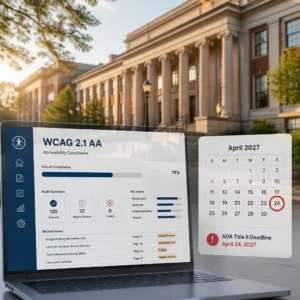
For public entities, the DOJ’s Title II final rule requires WCAG 2.1 Level AA for websites and mobile apps. In April 2026 the DOJ issued an Interim Final Rule that pushed the deadlines back by a year:
- Public entities serving 50,000 people or more: April 26, 2027 (was April 24, 2026)
- Smaller public entities and special districts: April 26, 2028 (was April 26, 2027)
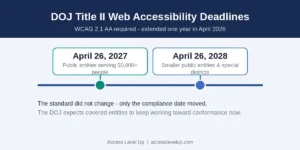
The standard itself didn’t move. It’s still WCAG 2.1 AA under Title II. Only the clock changed, and the DOJ was explicit that covered entities are expected to keep working, not to sit on the extra year.
The European Accessibility Act, if you sell into the EU
Plenty of US companies do, which is why this matters here. The EAA has been in force since June 28, 2025, covering e-commerce, banking, transport, media and more. Penalty ceilings vary by country. Reported maximums run to roughly €900,000 in Sweden, €600,000 in Spain, €100,000 in Germany, and €60,000 in Ireland, where severe cases can also carry up to 18 months’ imprisonment. As of mid-2026 the enforcement so far has mostly been warnings and corrective orders, with confirmed fines still limited. That will change.
The full WCAG 2.2 AA checklist: all 55 criteria
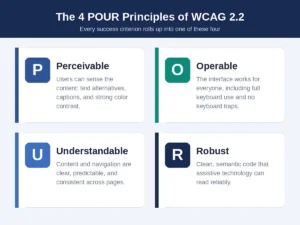
WCAG 2.2 has 86 success criteria across Levels A, AA and AAA. For AA conformance you have to meet all 31 Level A criteria plus all 24 Level AA criteria, so 55 in total. Six of those are new to 2.2. Below is the complete web accessibility checklist grouped by the four POUR principles: Perceivable, Operable, Understandable, Robust. Each item gets a quick “what it means” and a way to test or fix it.
Perceivable
- 1.1.1 Non-text Content (A): Every image, icon and non-text element has a text alternative. Test with a scan, then manually confirm decorative images are marked as decorative and functional ones describe their purpose.
- 1.2.1 Audio-only and Video-only, pre-recorded (A): Give a transcript for audio-only, and an audio description or media alternative for video-only.
- 1.2.2 Captions, pre-recorded (A): All pre-recorded video with audio has synced captions. Play it muted and check the captions carry dialogue and key sounds.
- 1.2.3 Audio Description or Media Alternative, pre-recorded (A): Describe visual-only information in audio or text.
- 1.2.4 Captions, live (AA): Live audio, like webinars, needs real-time captions.
- 1.2.5 Audio Description, pre-recorded (AA): Pre-recorded video with visual-only information needs audio description.
- 1.3.1 Info and Relationships (A): Headings, lists, tables and form labels are conveyed in code, not just visually. Navigate with a screen reader and confirm the structure is announced.
- 1.3.2 Meaningful Sequence (A): DOM order matches visual order, so nothing breaks with CSS off.
- 1.3.3 Sensory Characteristics (A): Instructions don’t depend only on color, shape, size or position. “Click the green button on the right” fails.
- 1.3.4 Orientation (A): Content works in both portrait and landscape unless one is essential.
- 1.3.5 Identify Input Purpose (A): Fields collecting personal data use the right autocomplete values.
- 1.4.1 Use of Color (A): Color isn’t the only signal. Links are distinguishable without it, usually by an underline.
- 1.4.2 Audio Control (A): Anything that auto-plays can be paused or stopped with the keyboard.
- 1.4.3 Contrast, Minimum (AA): Text hits at least 4.5:1 against its background, 3:1 for large text. This is the single most common failure, so start here.
- 1.4.4 Resize Text (AA): Text zooms to 200% with no clipping or overlap.
- 1.4.5 Images of Text (AA): Use real text, not pictures of text, except for things like logos.
- 1.4.10 Reflow (AA): Content collapses to a single column at 320px with no horizontal scroll.
- 1.4.11 Non-text Contrast (AA): Buttons, input borders, icons and focus rings meet 3:1 against what’s next to them.
- 1.4.12 Text Spacing (AA): Users can bump up line height and spacing without the layout falling apart.
- 1.4.13 Content on Hover or Focus (AA): Tooltips and dropdowns are dismissible, hoverable and stay put. Moving the pointer onto a tooltip shouldn’t make it vanish.
Operable
- 2.1.1 Keyboard (A): Everything works with a keyboard alone. Tab, Enter, Space, arrow keys, the whole site.
- 2.1.2 No Keyboard Trap (A): Focus can get into and back out of every widget, modals and video players included.
- 2.1.4 Character Key Shortcuts (A): Single-key shortcuts can be turned off or remapped.
- 2.2.1 Timing Adjustable (A): Time limits, like session timeouts, can be extended or switched off.
- 2.2.2 Pause, Stop, Hide (A): Moving or auto-updating content can be paused. Carousels are the usual offender.
- 2.3.1 Three Flashes or Below Threshold (A): Nothing flashes more than three times a second.
- 2.4.1 Bypass Blocks (A): A “Skip to main content” link lets people jump past repeated navigation.
- 2.4.2 Page Titled (A): Every page has a unique, descriptive title.
- 2.4.3 Focus Order (A): Focus moves in a logical order. Fix it with HTML structure, not positive tabindex values.
- 2.4.4 Link Purpose in Context (A): Link text makes sense on its own. “Click here” doesn’t.
- 2.4.5 Multiple Ways (AA): More than one way to find a page: navigation, search, a sitemap.
- 2.4.6 Headings and Labels (AA): Headings and labels actually describe what follows.
- 2.4.7 Focus Visible (AA): Focused elements show a visible indicator. Don’t delete the outline without replacing it.
- 2.4.11 Focus Not Obscured, Minimum (AA), new in 2.2: When something gets focus, at least part of it stays visible. Sticky headers and cookie banners are the usual culprits.
- 2.5.1 Pointer Gestures (A): Anything needing a pinch or swipe also works with a single pointer.
- 2.5.2 Pointer Cancellation (A): Actions fire on release, not press, so a mis-tap can be aborted.
- 2.5.3 Label in Name (A): A control’s accessible name includes its visible label.
- 2.5.4 Motion Actuation (A): Anything triggered by shaking or tilting has an on-screen control too.
- 2.5.7 Dragging Movements (AA), new in 2.2: Sliders and drag-and-drop lists have a non-drag alternative.
- 2.5.8 Target Size, Minimum (AA), new in 2.2: Touch targets are at least 24×24 CSS pixels, with a few layout exceptions.
Understandable
- 3.1.1 Language of Page (A): The page declares its language in the HTML, like
lang="en". - 3.1.2 Language of Parts (AA): A phrase in another language is marked as such.
- 3.2.1 On Focus (A): Moving focus onto something doesn’t yank the user somewhere new.
- 3.2.2 On Input (A): Changing a field value doesn’t auto-submit or jump context.
- 3.2.3 Consistent Navigation (AA): Repeated navigation stays in the same order and place across pages.
- 3.2.4 Consistent Identification (AA): The same function is labeled the same way everywhere.
- 3.2.6 Consistent Help (A), new in 2.2: Contact and help mechanisms sit in a consistent spot across pages.
- 3.3.1 Error Identification (A): Errors are described in text and the bad field is named.
- 3.3.2 Labels or Instructions (A): Every input has a visible label.
- 3.3.3 Error Suggestion (AA): Error messages say how to fix the problem, like “Enter a 10-digit phone number.”
- 3.3.4 Error Prevention for legal, financial, data (AA): Let users review and correct before they commit to a purchase or a data change.
- 3.3.7 Redundant Entry (A), new in 2.2: Don’t make people retype what the system already has. A “same as shipping” option counts.
- 3.3.8 Accessible Authentication, Minimum (AA), new in 2.2: Login can’t rely only on memory tests or puzzle-solving. If you use a CAPTCHA, give an accessible alternative like an emailed code or a password manager.
Robust
- 4.1.1 Parsing (A): Clean HTML: unique IDs, proper nesting, no duplicate attributes.
- 4.1.2 Name, Role, Value (A): Custom controls expose a name, role and state. Reach for semantic HTML first, and only add ARIA when you have to.
- 4.1.3 Status Messages (AA): Dynamic updates like “Item added to cart” are announced without stealing focus, usually with
aria-live="polite".
The six new WCAG 2.2 criteria you can’t skip
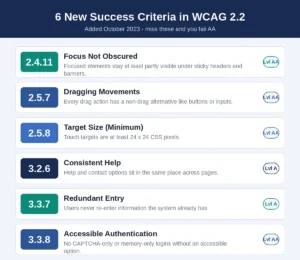
If your last review predates October 2023, you’re almost certainly missing these six. They all count toward AA:
- 2.4.11 Focus Not Obscured (AA): Keep focused elements at least partly visible. Sticky headers, cookie banners and chat widgets are the things to check.
- 2.5.7 Dragging Movements (AA): Give a non-drag path for every drag interaction.
- 2.5.8 Target Size (AA): Get touch targets to 24×24 CSS pixels.
- 3.2.6 Consistent Help (A): Keep help and contact links in the same place site-wide.
- 3.3.7 Redundant Entry (A): Stop asking for data you already have.
- 3.3.8 Accessible Authentication (AA): Don’t box people out at login with CAPTCHA-only verification.
Notice the theme. Every one of these targets mobile use, cognitive load, or the way assistive tech actually gets used day to day. That’s precisely where a lot of otherwise modern sites still trip. Bringing them up to standard is usually straightforward accessibility remediation work once you know what to look for.
How to actually use this checklist
A checklist you don’t act on is just a document. Here’s the workflow I’d run, in order.
Start with an automated scan. axe, Lighthouse or WAVE will surface a lot of the Level A and AA basics, contrast, missing alt, empty links, unlabeled fields. Just don’t mistake a clean scan for a compliant site. Automated tools catch maybe 30 to 40% of real issues, so they’re the floor, not the finish line.
Then go keyboard-only. Put the mouse down and move through every page and workflow with Tab, Enter, Space and the arrow keys. You’ll find the traps, the missing focus states, and the illogical tab order fast.
Next, test with an actual screen reader, NVDA on Windows, VoiceOver on Mac and iOS, or TalkBack on Android. This is where you learn whether your structure, labels and dynamic updates really work, versus whether they just look fine.
Check your mobile targets and gestures too. Measure hit areas against that 24-pixel minimum, and make sure anything drag-based has an alternative. Then write it all down. Keep a remediation log that ties each failure to its specific WCAG criterion, the page and element, and the fix you applied. That record is what makes clean accessible web design repeatable, and it’s also what backs up a VPAT or a legal defense later.
FAQ
Do I need WCAG 2.2 AA, or is 2.1 AA enough?
For DOJ Title II, meaning state and local government, WCAG 2.1 AA is the exact standard named. For private businesses under Title III and for EU compliance under the EAA, 2.2 AA is the stronger, future-proof target and is increasingly what settlements and procurement expect.
How many success criteria are in WCAG 2.2 AA?
Fifty-five across Levels A and AA: 31 at A and 24 at AA. Six of them are new in 2.2.
Can automated tools check my whole checklist?
No. Scanners handle contrast, missing alt and empty links well, but they miss keyboard traps, focus visibility, drag alternatives and most of the understandability criteria. Manual testing isn’t optional.
What fails most often in 2026?
The top six machine-detectable failures are low-contrast text (83.9% of homepages), missing alt text (53.1%), missing form labels (51.0%), empty links (46.3%), empty buttons (30.6%), and missing document language (13.5%).
Where this leaves you
A full WCAG 2.2 checklist isn’t a box to tick. It’s a build plan for a site that works for everyone, lowers your legal exposure, and tends to convert better as a bonus. With US accessibility lawsuits projected to clear 6,000 in 2026 and the EAA now live, the cost of doing nothing keeps going up.
If you’d like a straight, no-pressure read on where your site stands against the full WCAG 2.2 AA checklist, request a free accessibility assessment from our US-based team. We’ll flag your highest-risk issues first and lay out a clear path to fixing them.